

| All rights reserved. |
 | |  | |  | |  | |  |



 | |  | |  |
 |

Steps to select Language
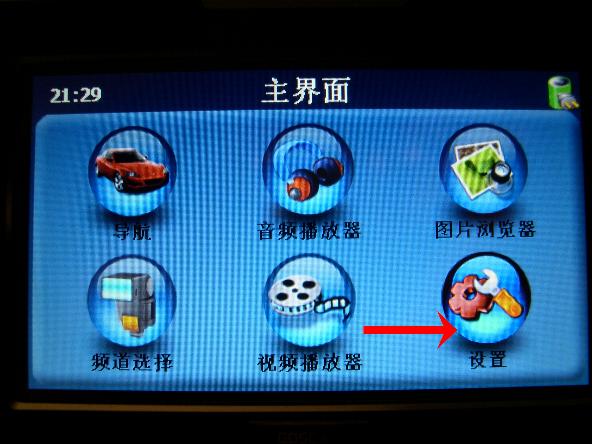
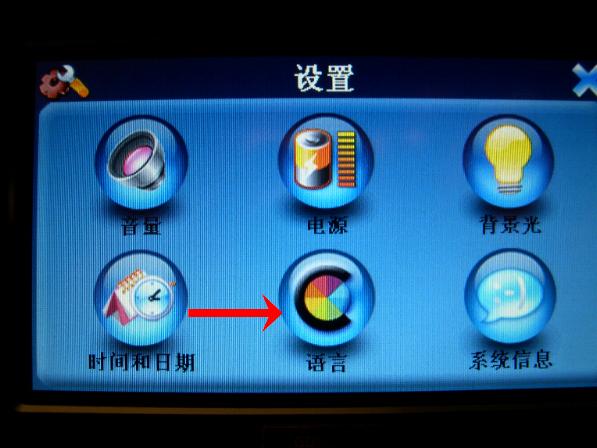

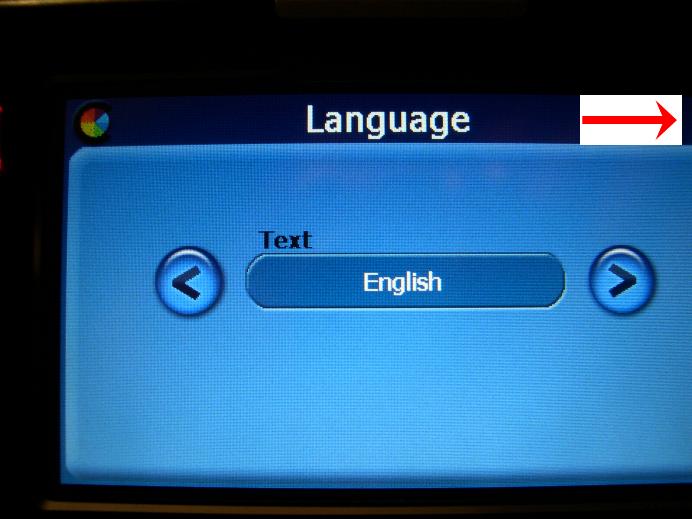
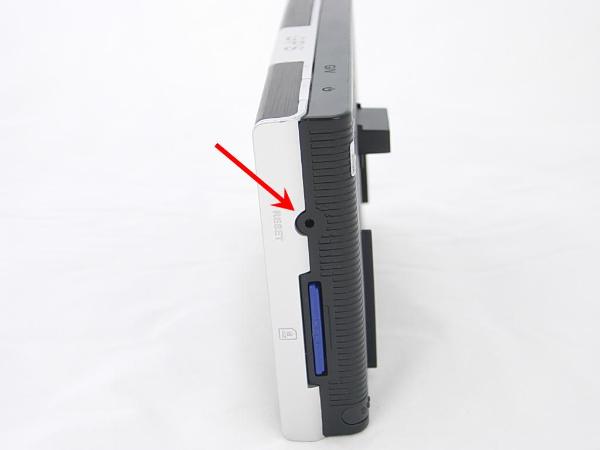
Steps to Reset


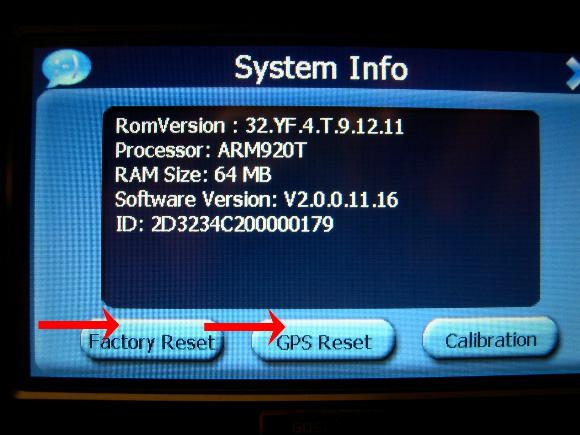
System Full Reset
Why my system stay on GPS mode even when I'm in reverse gear?
Problem is due to the GPS unit did not get the wireless signal. Please do the debugging steps below.
1. Verify the wireless clip-on receiver has good contact with the GPS unit. It should clip-on tie, and firm.
2. Verify the backup cam got the power. When on reverse, the LED surrounding the camera should turn to red.
(9901T's LED only turn to red when low light)
3. Check to see the distance and blockage from the camera and monitor. The license plate cam 8909T is normally
for shorter distance (under 20 feet), and the round cam 8907T good up to 30 feet. Move the GPS with wireless clip-on
closer to the camera while the camera is on and check whether it is due to distance or blockage problem.
If distance too far, for 8907T, you might try to move the transmitter closer, or less blockage to the monitor. Or add
extension cord to move the transmitter closer to the front. For 8909T, you might want to switch to 8907T if it is distance
and signal problem.
4. Verify the channel on the GPS match the channel of the camera. Power on the camera, and select both channel on
the monitor to test. On Main Menu -> Set Rate (channel selection)->CH1 or CH2, to match the corresponding
frequency with the camera.
5. If you see the camera image, but lots interference even when camera and monitor in close distance. It might
caused by other 2.4Ghz wireless product. Power off your blue-tooth, or drive away from your home wireless router or
cordless phone, see check to see any improvement on the interference.
Problem is due to the GPS unit did not get the wireless signal. Please do the debugging steps below.
1. Verify the wireless clip-on receiver has good contact with the GPS unit. It should clip-on tie, and firm.
2. Verify the backup cam got the power. When on reverse, the LED surrounding the camera should turn to red.
(9901T's LED only turn to red when low light)
3. Check to see the distance and blockage from the camera and monitor. The license plate cam 8909T is normally
for shorter distance (under 20 feet), and the round cam 8907T good up to 30 feet. Move the GPS with wireless clip-on
closer to the camera while the camera is on and check whether it is due to distance or blockage problem.
If distance too far, for 8907T, you might try to move the transmitter closer, or less blockage to the monitor. Or add
extension cord to move the transmitter closer to the front. For 8909T, you might want to switch to 8907T if it is distance
and signal problem.
4. Verify the channel on the GPS match the channel of the camera. Power on the camera, and select both channel on
the monitor to test. On Main Menu -> Set Rate (channel selection)->CH1 or CH2, to match the corresponding
frequency with the camera.
5. If you see the camera image, but lots interference even when camera and monitor in close distance. It might
caused by other 2.4Ghz wireless product. Power off your blue-tooth, or drive away from your home wireless router or
cordless phone, see check to see any improvement on the interference.
Why my system automatically shut-off even when I am driving?
Problem is due to the GPS unit power saving setting. Please follow the steps below to adjust the setting.
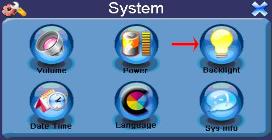
Main Menu -> System -> Backlight -> AC Power (set to never)
And make sure the cigarette lighter power adapter got good connection on both with the car and GPS unit.
Problem is due to the GPS unit power saving setting. Please follow the steps below to adjust the setting.
Main Menu -> System -> Backlight -> AC Power (set to never)
And make sure the cigarette lighter power adapter got good connection on both with the car and GPS unit.

Why sometimes the screen alternate between a blank and GPS screen when my camera was not power on?
Wireless camera signal will activate the monitor to video view, and out of GPS view. Sometimes while driving
forward, if there is video signal in close range of the camera signal nearby, your system might be out of GPS view,
and you might see other video image from wireless camera around you. It is expected.
Wireless camera signal will activate the monitor to video view, and out of GPS view. Sometimes while driving
forward, if there is video signal in close range of the camera signal nearby, your system might be out of GPS view,
and you might see other video image from wireless camera around you. It is expected.
Frequent Ask Questions on GPS w/ Backup Camera System :
Why my system stay on GPS mode even when I'm in reverse gear?
Why my system automatically shut-off even when I am driving?
Why sometimes the screen alternate between a blank and GPS screen when my camera was not power on?
Why I can not get the GPS, even when I selected Navigation on the Main Menu?
System is in Chinese now, how to select Language?
How to Reset the system?
How to clip on the GPS to the window mount holder?
How to adjust the GPS volumn?
Why my GPS does not hold charge?
My camera image got rotated/versed, what now?
Why my system stay on GPS mode even when I'm in reverse gear?
Why my system automatically shut-off even when I am driving?
Why sometimes the screen alternate between a blank and GPS screen when my camera was not power on?
Why I can not get the GPS, even when I selected Navigation on the Main Menu?
System is in Chinese now, how to select Language?
How to Reset the system?
How to clip on the GPS to the window mount holder?
How to adjust the GPS volumn?
Why my GPS does not hold charge?
My camera image got rotated/versed, what now?
Why I can not get the GPS, even when I selected the Navigation on the main menu?
1. Please make sure you insert SD card onto the unit. GPS System would require the SD card to work.
2. Please use/test the GPS on your drive way, instead of inside the garage, or at home. The system would require
satellites GPS signal to work.
3. When all attempts fail, you can reset the system. First trail MainMenu->System->SystemInfo->reset. If not working,
then System Full Reset. Detail see "How to reset the system?"
NOTE: Please do not connect to PC on initial setup. Always connect to car cigarette lighter cable initially.
1. Please make sure you insert SD card onto the unit. GPS System would require the SD card to work.
2. Please use/test the GPS on your drive way, instead of inside the garage, or at home. The system would require
satellites GPS signal to work.
3. When all attempts fail, you can reset the system. First trail MainMenu->System->SystemInfo->reset. If not working,
then System Full Reset. Detail see "How to reset the system?"
NOTE: Please do not connect to PC on initial setup. Always connect to car cigarette lighter cable initially.
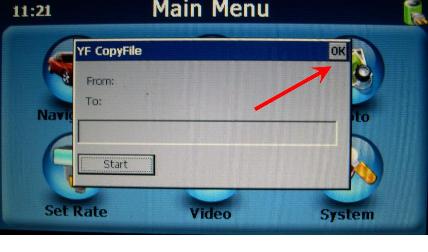
When system initial startup,
or after reset, you might see
the following window pop up.
Please select the "OK", then
continue.
or after reset, you might see
the following window pop up.
Please select the "OK", then
continue.
How to clip on the GPS to the window mount holder?
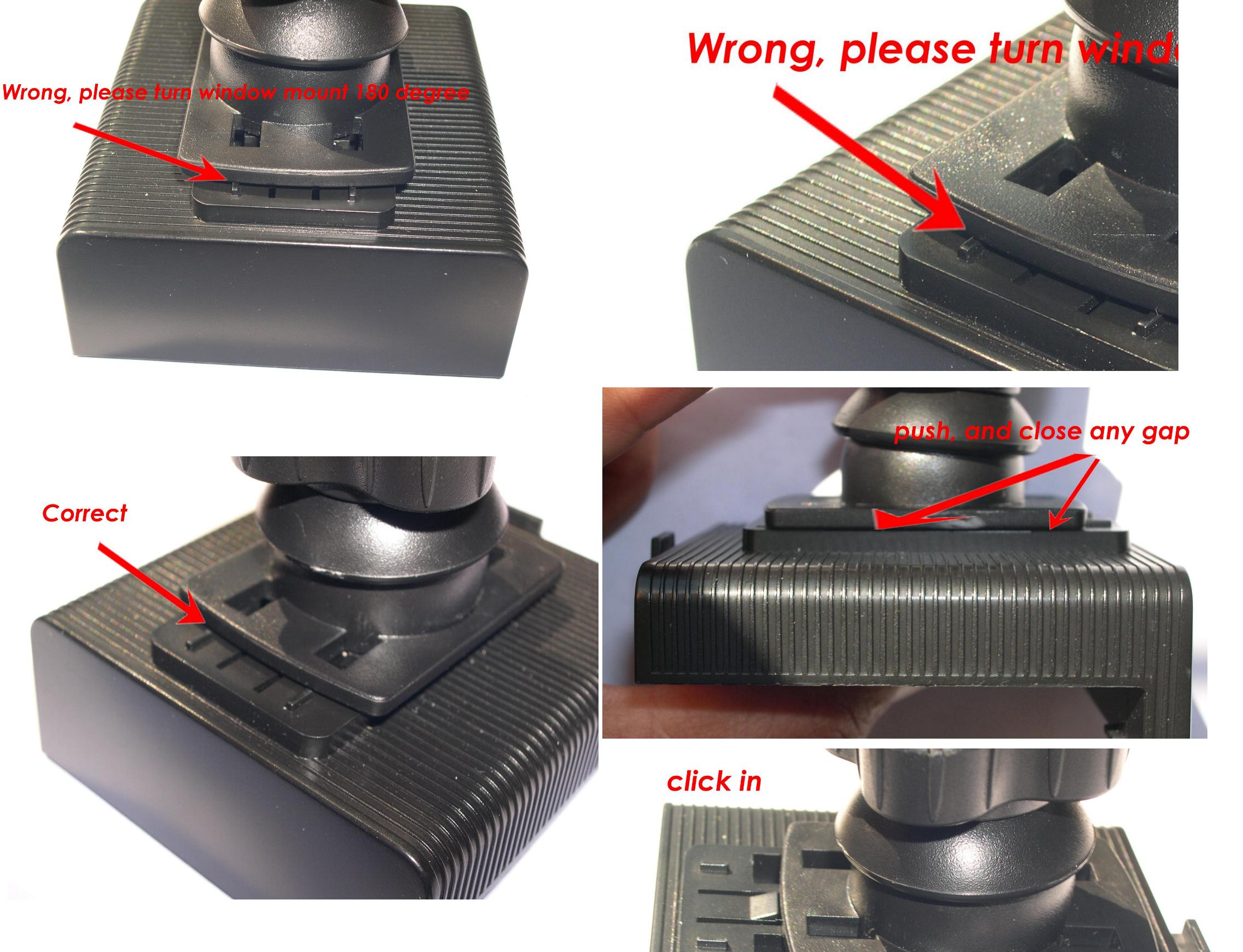
Please make sure the direction is correct.
Otherwise, will NOT clip on.
See picture for clip on (click on the picture to view
the detail). On the initial clip, might take a little
push. Once in-out couple of times, it would be
easy.
Please make sure the direction is correct.
Otherwise, will NOT clip on.
See picture for clip on (click on the picture to view
the detail). On the initial clip, might take a little
push. Once in-out couple of times, it would be
easy.
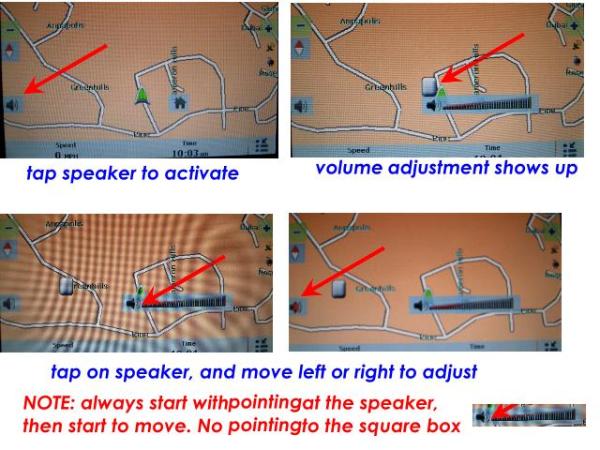
How to adjust GPS volume?
There are two places of volume adjustment. One is before select of "Navigation", which control only
volume outside of "Navigation", another is volume selection inside of the "Navigation". Please follow
the graphic instruction below.
There are two places of volume adjustment. One is before select of "Navigation", which control only
volume outside of "Navigation", another is volume selection inside of the "Navigation". Please follow
the graphic instruction below.
Why my GPS does not hold charge?
The GPS takes about 5-6 hours for continue car power to fully charge the battery.
If you take a short trip everyday, system will not charge up.
After 1-2 hours trip and continue car power charge, you can verify the battery charge by
exit the GPS into the main menu, select Battery, and you should see 10% charged.
If you use PC USB charge, it takes 12 hours to charge 50%.
The GPS takes about 5-6 hours for continue car power to fully charge the battery.
If you take a short trip everyday, system will not charge up.
After 1-2 hours trip and continue car power charge, you can verify the battery charge by
exit the GPS into the main menu, select Battery, and you should see 10% charged.
If you use PC USB charge, it takes 12 hours to charge 50%.
My camera image got rotated/versed, what now?
When you are on camera view, you can touch top-left, bottom-right conner of the LCD to rotate
the image. See manual for detail.
When you are on camera view, you can touch top-left, bottom-right conner of the LCD to rotate
the image. See manual for detail.